November 27, 2026 - Web Development
Digital ChordsWeb Application Security: Threats, Defenses and a Practical Checklist
Users generally see only the front end of a web application, but the functionality behind the scenes is much more robust. Behind each login, payment, form, and API request are systems processing and sometimes storing sensitive information. Proper protection of web application functionality is as important as protection of the systems and data in the backend of an organisation. Web application security should be implemented during each step of the software development lifecycle to prevent security weaknesses from being embedded in the design and implementation of a web application.
Security must be taken into account when developing or enhancing a web application, along with its functionality, performance, scalability, and user experience. Digital Chords can assist businesses in designing and planning web solutions based on the technical and operational requirements.
This guide provides information about the most common threats to web application security. It also illustrates how the latest innovations in the security controls space work, and it describes the due diligence businesses should undertake before releasing a new or updated web application to the public.
What Is Web Application Security?
Web application security is the protection of software, its users, and data from various threats. It includes web application code and dependencies, run-time environment, user and application data, APIs, and other services. Basic website protection focuses on preventing threat actors from gaining unauthorized access to web resources, while web application security focuses on how users and data interact with and flow through various systems.
An e-commerce application, for example, may have customer account information, payment requests, product info and inventory, and order history, among other things. Each of these features represents a possible security risk, for example, poor access controls, validation of input, or how the app handles data.
An application is considered secure when it protects these three features:
Confidentiality: Sensitive data is accessible only by authorized users.
Integrity: Data and application functions are not changed without permission.
Availability: Users can access the application and its services.
A site just displays information, while an app lets users interact with data. This means that both need protection, but apps usually have more complicated security needs.
Why is Web Application Security Important?
A successful attack on a web application can lead to loss of confidential data, negative effects on business, and loss of customer trust.
All businesses have web applications to take care of transactions, operations, and customer management. An attack on web applications can affect more than the application. It can impact other applications and systems that the business has integrated.
Some of the effects of inadequate web application security are:
Customer information exposure: Attackers can access customer information or business records.
Loss of money: Effects can include fraudulent transactions, loss of money to recoup the business, and legal costs.
Loss of service: Attack on availability of a service can deny customers and employees access to the service.
Loss of trust of customers: Customers lose trust in a business that fails to protect customer information.
Violation of compliance: If a business has information that is protected by law, and a security incident happens, that business may be required to be investigated and report the incident.
NIST suggests that to prepare for risks, make security the responsibility of all engineering staff, protect information, and respond to incidents, organizations adopt a framework that enables them to integrate security practices into software development lifecycle. This will ensure that security is a continuous responsibility of engineering staff.
What are the Top Web Application Threats?
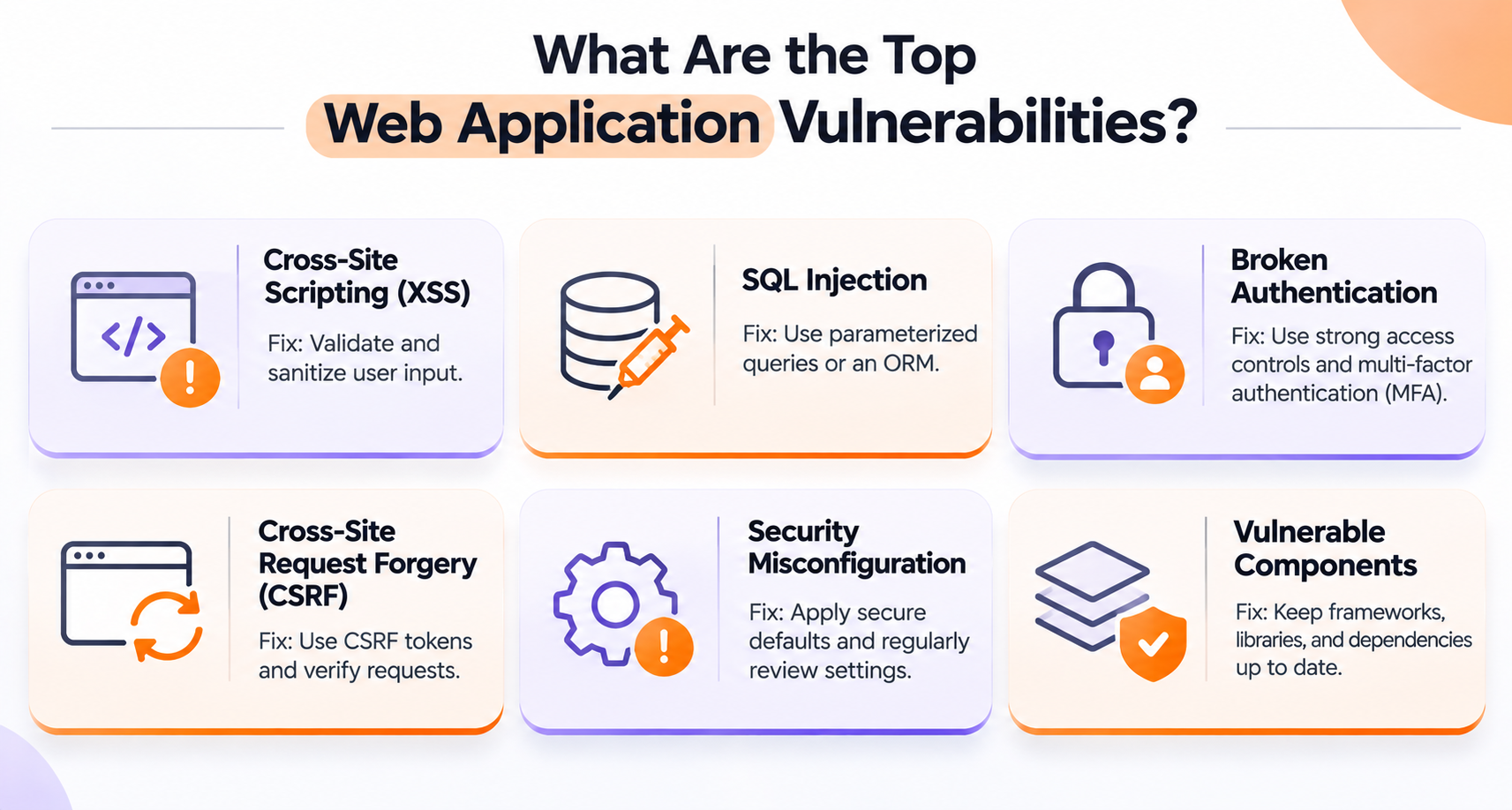
The main web application threats are poor access controls, injection attacks, authentication failures, security misconfigurations, and using components with known vulnerabilities.
The OWASP Top 10 2025 identifies the major categories of web application security risks. Understanding the nature of these risks will help develop mitigations for the threats. SQL injection, cross-site scripting (XSS), and cross-site request forgery (CSRF) are threats that remain relevant to developers. These threats are grouped into broader risk areas in the latest OWASP classification.
Common Web Application Security Threats
The most common web application vulnerabilities include:
Inadequate access control
Injection
Broken authentication and session management
Insecure desktop or app integration
Insufficient logging and monitoring
Security misconfiguration
Vulnerable and outdated software components
Excessive Trust in Third-Party Components
Vulnerability | What It Means | Recommended Defense |
SQL Injection | Untrusted input alters a database command | Use parameterized queries and least privilege database accounts |
Cross-Site Scripting (XSS) | Untrusted content executes as code in a user's browser | Use output encoding, safe DOM practices, and HTML sanitization |
Cross-Site Request Forgery (CSRF) | A browser is tricked into making an unwanted request | Use CSRF tokens and appropriate cookie protections |
Broken Authentication | Weak controls allow unauthorized account access | Use multi-factor authentication and protect sessions |
Security Misconfiguration | Improperly configured apps, servers, or cloud resources create security risks | Properly harden configurations and remove unnecessary services |
Vulnerable Components | Use of outdated libraries containing security flaws | Use software composition analysis and update dependencies |
SQL Injection
This occurs when a command, usually a database query, is altered by untrusted input. Rather than returning data, the query may be instructed to perform a transaction.
One example is a search form, where the query is constructed by untrusted input and passed directly to the database.
Prevention: Limit the permissions granted to the database. Use parameterized queries to prevent unexpected formatting of the query. Validate expected input formats. SQL injection remains a key injection risk in the OWASP Top 10:2025.
Cross-Site Scripting (XSS)
XSS occurs when an application doesn’t validate or filter user input, and as a result displays content that allows a user’s browser to interpret it as executable code.
This can lead to user data exposure and/or session manipulation. It can also alter the appearance or behavior of a web application.
Prevention: Use the output-escaping mechanism provided by the framework. React developers should avoid unsafe HTML rendering methods, like dangerouslySetInnerHTML.
Cross-Site Request Forgery (CSRF)
CSRF allows a malicious user to make a request to alter the state of an application on behalf of a trusted user (e.g., making a request to alter a trusted user’s account settings).
Prevention: Use a combination of anti-CSRF tokens, server-side request validation and appropriate SameSite cookie settings.
XSS vs CSRF vs SQL Injection: What is the Difference?
Attack Type | What It Targets | Main Protection | What Does Not Solve It |
XSS | User's browser | Output encoding and sanitization | CSRF tokens |
CSRF | Authenticated browser requests | CSRF tokens and secure cookie settings | CORS alone |
SQL | Injection database queries | Parameterized queries | HTML sanitization |
Are CSRF Tokens Needed?
Yes, unless cookie-based authentication is used in an established framework or architecture that already incorporates protection against CSRF. The SameSite cookie attribute provides additional protection and should not be used to replace a CSRF protection strategy.
There are several other important threats, including broken access control, insecure design, cryptographic failures, and failures in the software supply chain, as well as insufficient security logging.
What Is the OWASP Top 10?
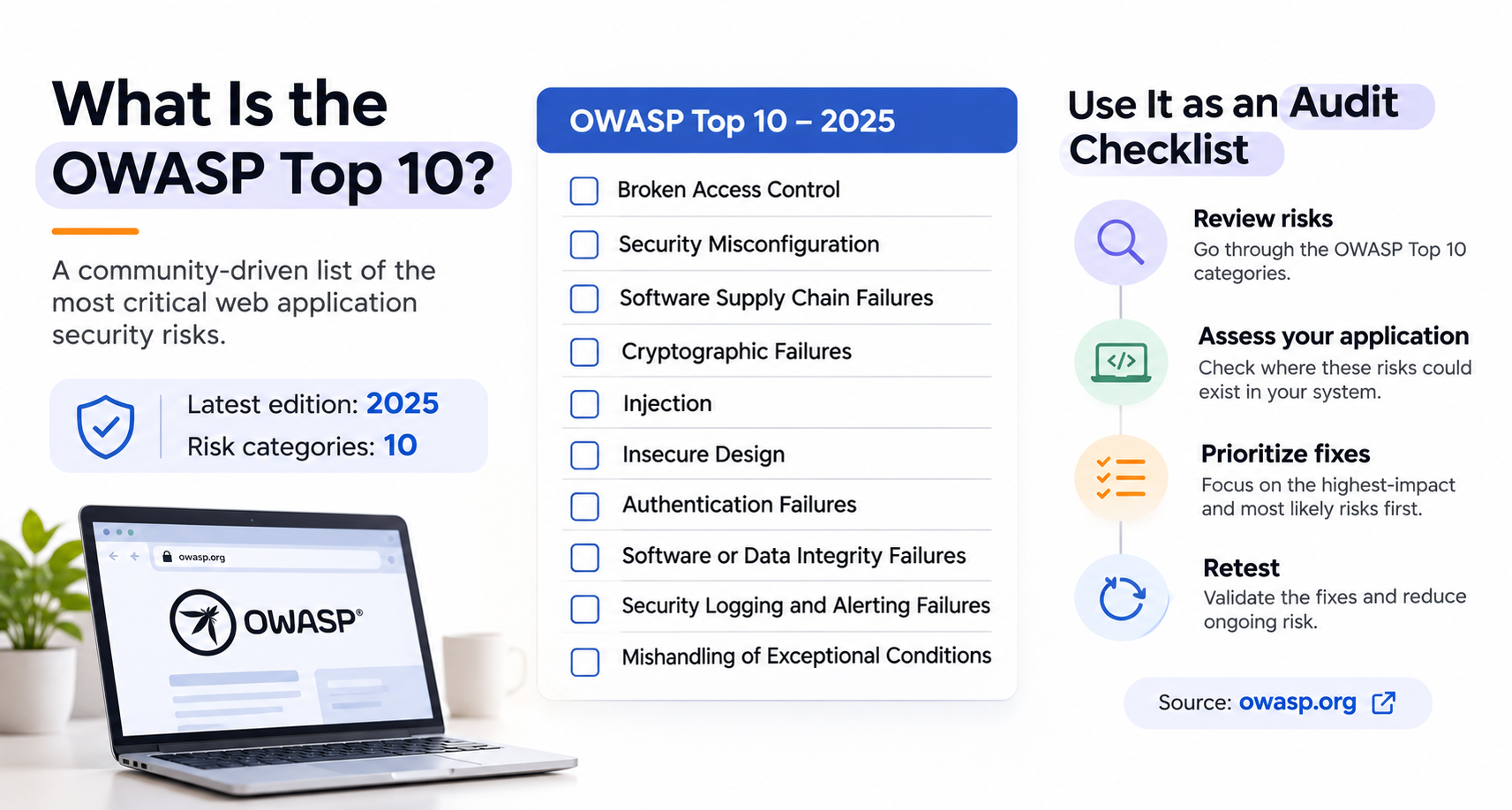
The OWASP Top 10 is a widely adopted awareness document that describes the most critical security risks with web applications and assists development teams in identifying security controls to address these risks.
This document is maintained by the Open Worldwide Application Security Project (OWASP), a not-for-profit organization that works to improve the security of software.
The most recent release is OWASP Top 10:2025, which is the 8th edition of this project.
OWASP Top 10: 2025
A01: Broken Access Control
A02: Security Misconfiguration
A03: Software Supply Chain Failures
A04: Cryptographic Failures
A05: Injection
A06: Insecure Design
A07: Authentication Failures
A08: Software/Data Integrity Failures
A09: Security Logging and Alerting Failures
A10: Mishandling of Exceptional Conditions
Development teams can use these categories as an initial checklist for controls during architecture reviews, code reviews, testing and security assessments.
The OWASP Top 10 is an awareness document and does not guarantee or provide security certification to development teams that an application is free from risks.
Application teams need to take other considerations into account if the application offers extensive API functionality. They should also take a look at the OWASP API Security Top 10:2023, which discusses risks such as broken object-level authorization and broken authentication, as well as unsafe API consumption and resource consumption.
How do you secure a web application?
You implement defensive controls in the architecture, source code, authentication, infrastructure, and DevSecOps pipeline to secure a web application.
Essential Web Application Security Controls
1. Input Validation and Output Handling
Always treat input as if it were malicious. Data may be provided via forms, URLs, APIs, or other mechanisms. Data may also be provided by trusted sources; however, it should still be validated.
2. Improve Authentication and Session Management
Control access to protected resources using stronger authentication mechanisms and limit the duration of a user’s authenticated session. Authentication methods should use secure storage to protect passwords.
3. Least Privilege Access Control
Users should be granted the least privileged access required to complete their tasks. Control access on the server to support least-privilege access control.
4. Manage Open Source Components
Inventory open source components used in your application and ensure all components and their licenses are up to date.
5. Protect Sensitive Information and Secrets
Do not store secrets in code or other publicly accessible locations. Use protected environment variables or a secure secrets management system to store sensitive configuration.
Use HTTPS to protect the integrity of communication and ensure your data is stored using appropriate encryption.
6. Maintain Security Logs and Monitoring
Log important security events such as failed and suspicious activity on accounts and unusual access.
The logs themselves should be secured against unauthorized changes and should not contain sensitive information such as passwords, authentication tokens, or personally identifiable information.

Build Smarter, Scale Faster, With Custom Software.
From CRM automation to mobile apps DigitalChords delivers enterprise grade digital solutions tailored to your business.
Can SQL Injection Be Prevented or Detected?
Yes. SQL Injection can be prevented using parameterized queries, validation of input, and bounding permissions of the database. Testing and monitoring the application can help detect this attack.
For example, in Node.js, by using parameterized queries, we can isolate user-supplied values from the SQL query like below.
javascript
const result = await db.query(
'SELECT * FROM users WHERE email = $1',
[email]
);
There are many other aspects of the implementation, such as bounding permissions and error handling, that need to be taken care of as well.
What is the Difference Between SAST and DAST?
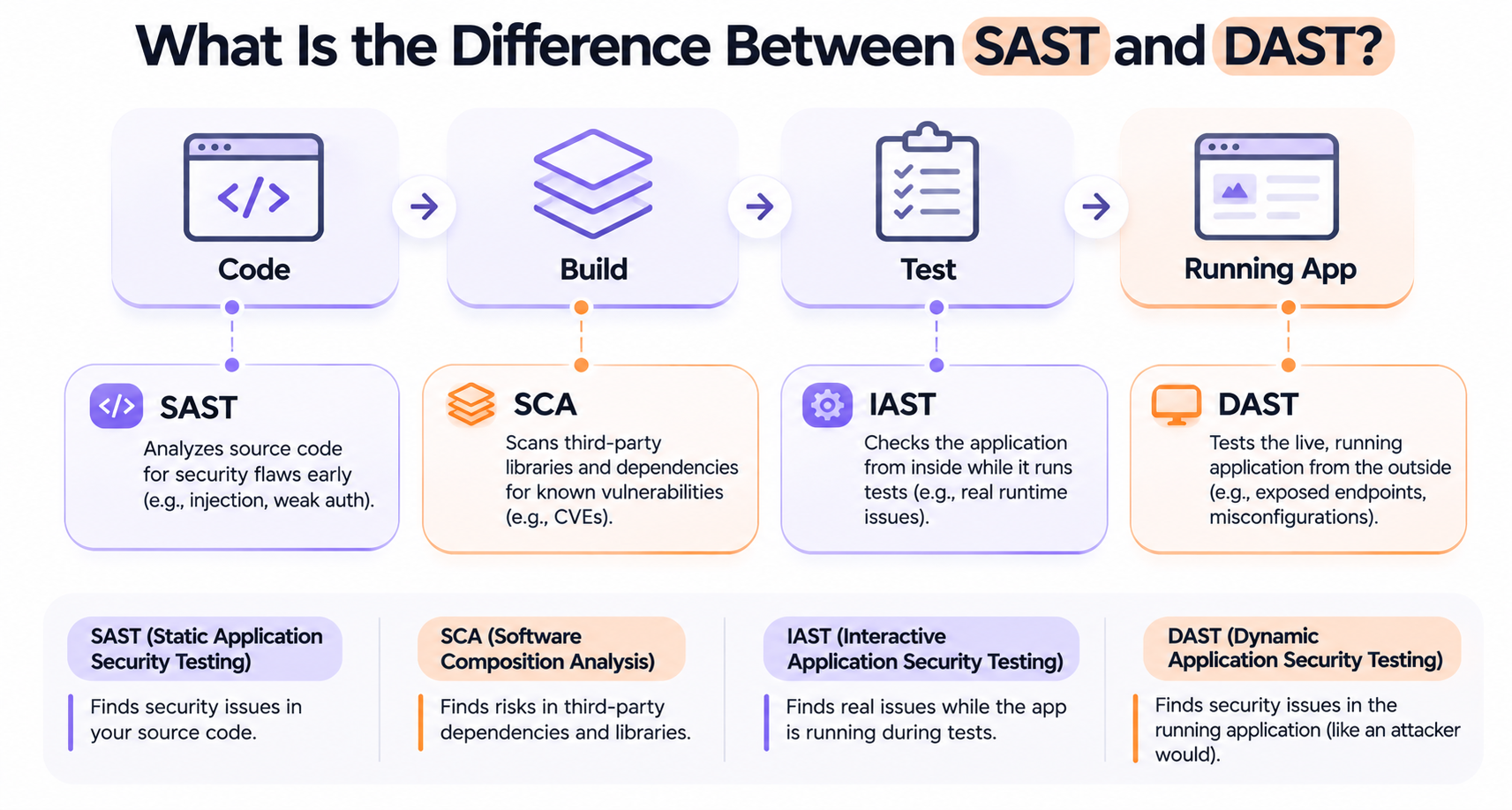
In SAST, the code is evaluated without running the application. In DAST, the application is evaluated while testing from the outside. IAST combines runtime application testing with inside application testing, and SCA tests dependencies for known vulnerabilities.
All of these approaches to testing applications have their respective purposes, and all of them taken together will provide a secure testing environment for the application.
What do the acronyms mean?
Testing Method | What it Checks | When to Use It |
SAST | Potential insecure coding patterns in source code | During code development and review |
DAST | Security flaws present in a running application | During testing prior to release |
IAST | Application behavior and the flow of application data | During integration and functional testing |
SCA | Open-source software (OSS) dependencies, licences, and known vulnerabilities | During the installation of dependencies and the CI/CD pipeline |
DevSecOps involves integrating security checks throughout the software development and deployment lifecycle. SecDevOps goes further placing security as the first priority at every decision point, before development even begins.
What is a Web Application Firewall (WAF)?
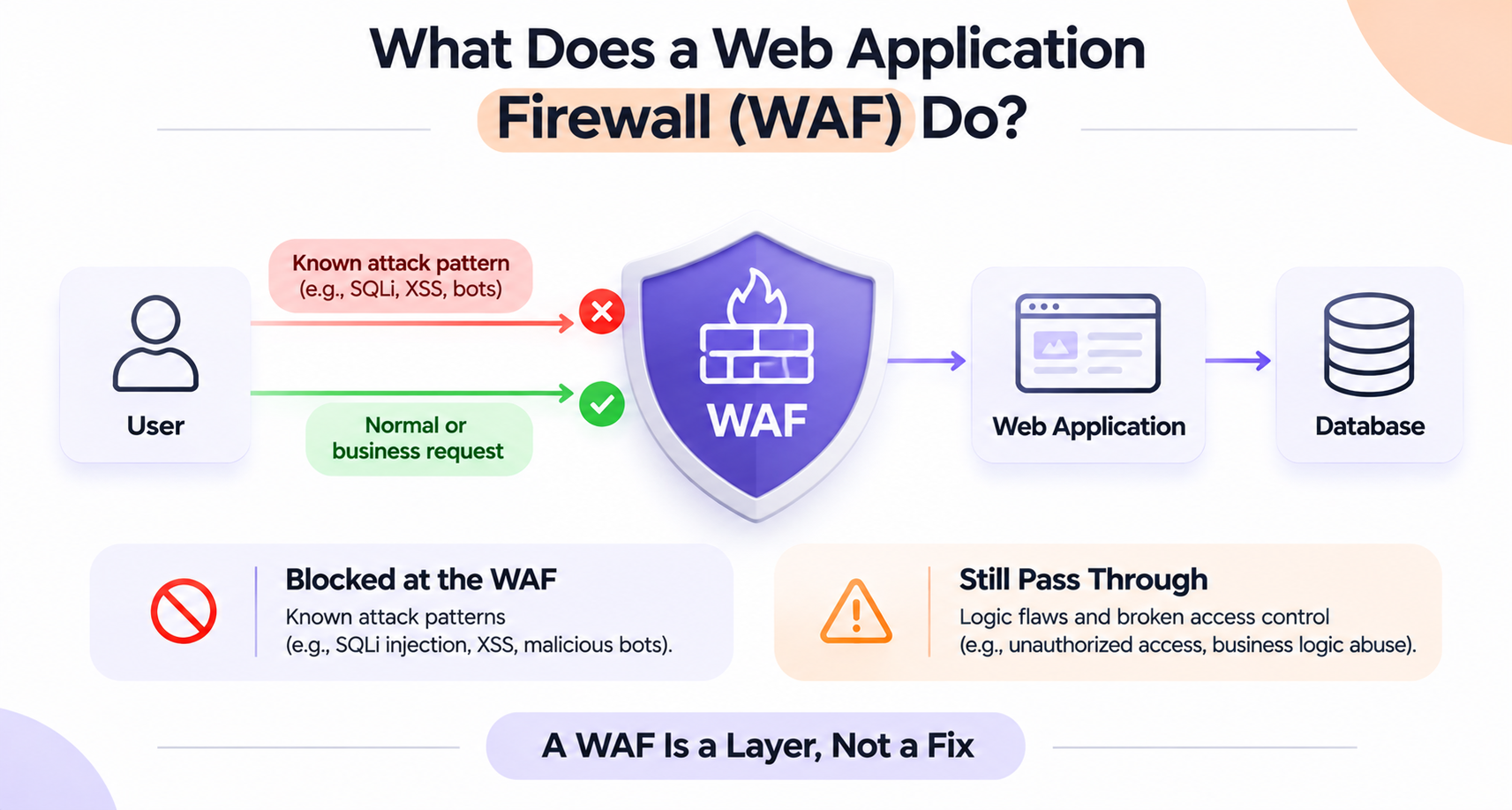
A Web Application Firewall (WAF) protects a web application from potentially malicious HTTP requests.
It typically operates at layer 7 of the OSI model and is deployed as a reverse proxy. It is distinct from a traditional network firewall or a load balancer.
A WAF helps protect web applications from various attack patterns that are identified and published. It also protects against malicious bots and automated attacks.
What Can and Cannot a WAF Protect Against?
Is a WAF necessary?
Not every application requires the same configuration of WAF, but it can be a good security layer to add for public-facing applications that handle sensitive data or encounter high level of traffic.
Is a web application firewall enough to secure a web application?
No. A WAF can not protect a web application if the application has insecure code, lacks proper authentication/access control, has unmanaged dependencies or is not being monitored properly.
Can a WAF prevent SQL injection, block XSS or stop DDoS attacks?
A WAF can prevent some SQL injection and XSS attempts, but not all. DDoS protection varies from product to product and depends on the level of traffic a WAF is trying to protect.
Is a WAF a firewall, a reverse proxy, a layer 7 device or a load balancer?
A WAF is an application-layer security device that is generally implemented as a reverse proxy. Depending on the implementation, a WAF can also act as a load balancer or cloud edge device. The primary function of WAF is application traffic filtering.
WAF vs RASP: Understanding the Difference
A WAF protects application traffic at the edge, while RASP protects at the application runtime. Implementing RASP gives better control and visibility into the application, but it does require additional testing to verify its performance.
Neither technology solves securing application code, and a WAF should always be used in addition to addressing vulnerable application code.
How Do You Secure APIs and Third-Party Code?
APIs connect web apps to databases, payment processors, customer management systems, and other business systems. Security weaknesses in one of these integrations can pose a risk to the entire web app.
Some best practices include the following:
Use authentication to verify the identity of the API client and protect the confidentiality of the API keys.
Enforce object-level access control. Simply checking if a user is logged in doesn’t ensure he or she has access to the particular record he or she is requesting.
Limit the number of requests a user can make in a given period.
Verify requests are made using the appropriate HTTP method and content type, and that the structure of the request is valid.
Restrict the integrations of third-party systems to the minimum set of permissions required.
Keep an up-to-date list of APIs and third-party systems the app integrates with.
How Do I Fix and Prioritize Web Application Vulnerabilities?
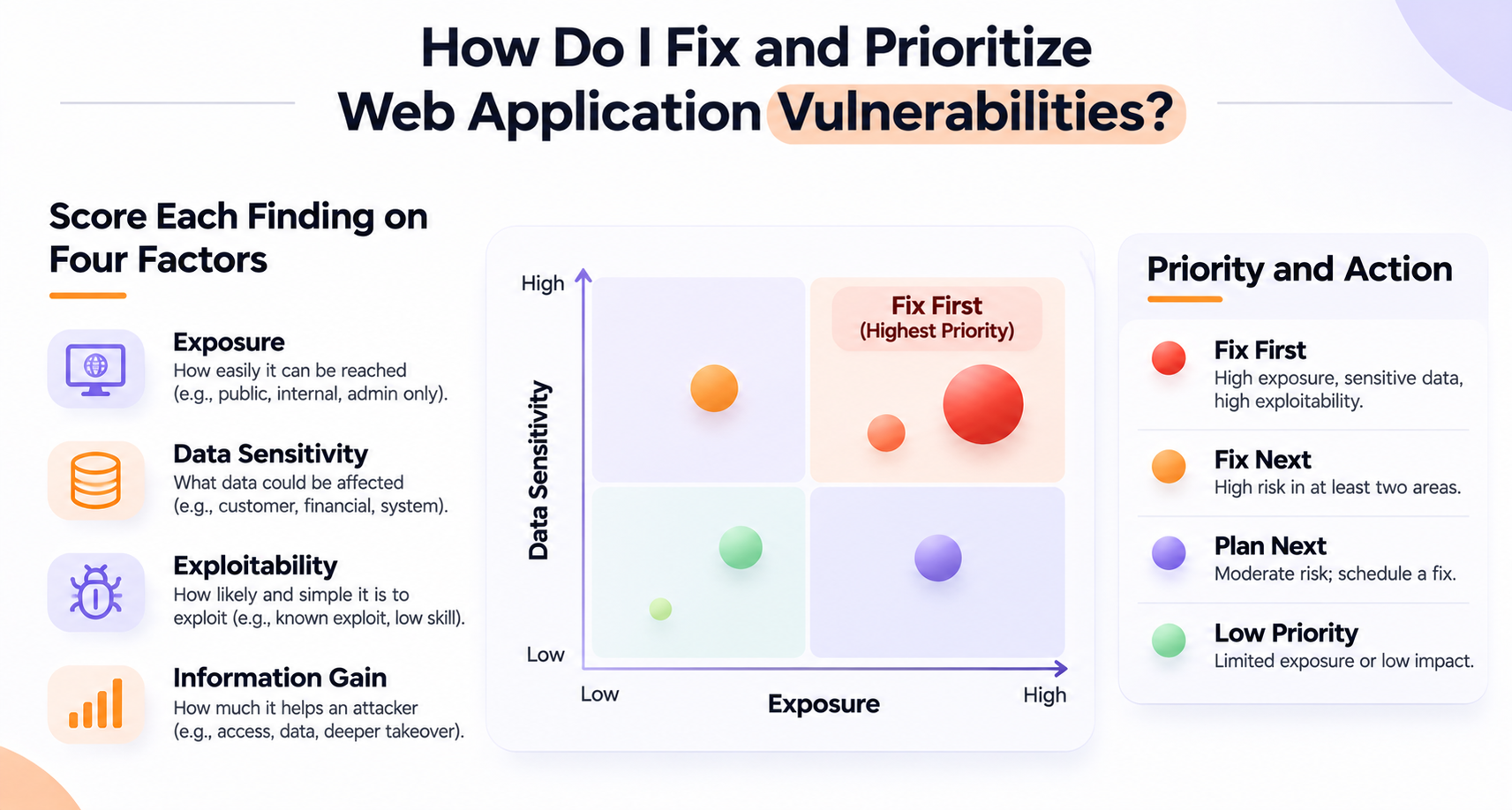
Prioritize the fix of web application vulnerabilities based on exposure (how easy it is for an attacker to exploit the vulnerability) and sensitivity of the information or systems the vulnerability can put at risk.
While considering the severity of a vulnerability is important, don’t make it the only factor when deciding the order of remediation.
Consider a situation where a vulnerability in a customer-facing application exposes the records of thousands of customers. Fixing that application may be more important than fixing a similar vulnerability that exists in an application used by only a handful of employees.
A Useful Vulnerability Prioritization Framework
Risk Factor | What to Evaluate | Priority Consideration |
Exploitability | Is there evidence of exploitation? | Higher if exploitation is known or straightforward |
Exposure | Is the app publicly accessible? | Higher for apps that are accessible from the internet |
Data sensitivity | Does the vulnerability expose confidential info (e.g. personal, financial, etc.)? | Higher if sensitive info is exposed |
Business impact | Could it affect essential business activities? | Higher for activities that are critical to the business |
Prioritize remediation based on the above considerations. Make sure that the fix is tested and effectively closes the vulnerability.
A Practical Web Application Security Checklist for Development Teams
Security controls should be incorporated into every phase of the software development lifecycle (SDLC). Teams creating applications with React, Next.js, and Node.js should consider the following checklist.
During Design and Planning
Identify the sensitive data and critical business processes
Define authentication and authorization rules
Review the design and architecture of the APIs and assess potential security risks
Decide on data protection and retention policies
During Development and Code Review
Validate and/or transform sensitive data (i.e., don't store plaintext passwords in the database)
Use parameterized and typed queries
Process to respond to notifications of security vulnerabilities
Apply safe output encoding and sanitization
Protect authentication tokens and session cookies
Review access control for all sensitive operations
Avoid hardcoding credentials and API keys
Inspect application code for unsafe code patterns
During CI/CD and Testing
Run SAST scans on application code
Conduct SCA scans on open-source application dependencies
Test application endpoints via DAST
Inspect API permissions and application authentication
Assess configuration of environments and infrastructure
Address all security concerns before general release
Before and After General Release
Validate TLS/SSL certificates and HTTPS
Disable unneeded application and system services and debugging features
Validate production configurations for application and infrastructure
Enable security logging and monitoring
Establish a process for the update and patching of dependencies
Document incident response and recovery plans
Conduct regular security assessments
Web application security is not a one time task. it is a continuous commitment built into every phase of development. By adopting the controls and practices outlined in this guide, development teams can significantly reduce their exposure to the most critical threats. If you need help assessing or securing your web application, Digital Chords is ready to help.
Build Smarter, Scale Faster, With Custom Software.
From CRM automation to mobile apps DigitalChords delivers enterprise grade digital solutions tailored to your business.
Frequently Asked Questions
Common threats include broken access control, SQL injection, cross-site scripting, authentication failures, CSRF, security misconfiguration, and vulnerable third-party dependencies. Some of these risks can be understood using the OWASP Top 10.
Some known SQL injection patterns can be detected and prevented by a WAF. But it does not guarantee that it will block all injection flaws. Parameterized queries and secure database access are still important.
No. Cross-Origin Resource Sharing (CORS) is used to regulate how browsers use web pages to access resources from other origins. It's not a substitute for CSRF protection. For applications that implement cookie-based authentication, proper server-side CSRF defenses should be in place.
Not automatically. JWTs that are stored in the browser's cookies can be transmitted automatically by the browser, giving rise to CSRF concerns. Bearer tokens explicitly associated with authorization headers are handled differently by the browser, but still need to be stored securely and implemented carefully.
It is not a CSRF token; CSRF tokens guard against forged authenticated requests; XSS is about untrusted content being executed in a browser. These are two different vulnerabilities that must be protected individually.
There is no universal best practice. A WAF is a filter for passing application traffic at the network edge; a RASP monitors the behaviour of applications while they are running. They deal with different aspects of security and can be complementary.
Common Vulnerabilities and Exposures (CVE) is the acronym for this. It detects public vulnerabilities in security. CVSS is an acronym for Common Vulnerability Scoring System, which offers a standardized method for communicating the severity of a vulnerability.
Security testing should be done during development and deployment, and not just as a one-time event. Regularly, teams should perform automated checks, review dependencies upon update release and perform additional assessments after major application changes.
While HTTPS insulates data as it moves between the browser and the server, it does not stop SQL injection attacks, XSS attacks, broken authentication, insecure access controls, or vulnerable dependencies.